Rytr Review 2026- I Used It for 30 Days — Honest Verdict
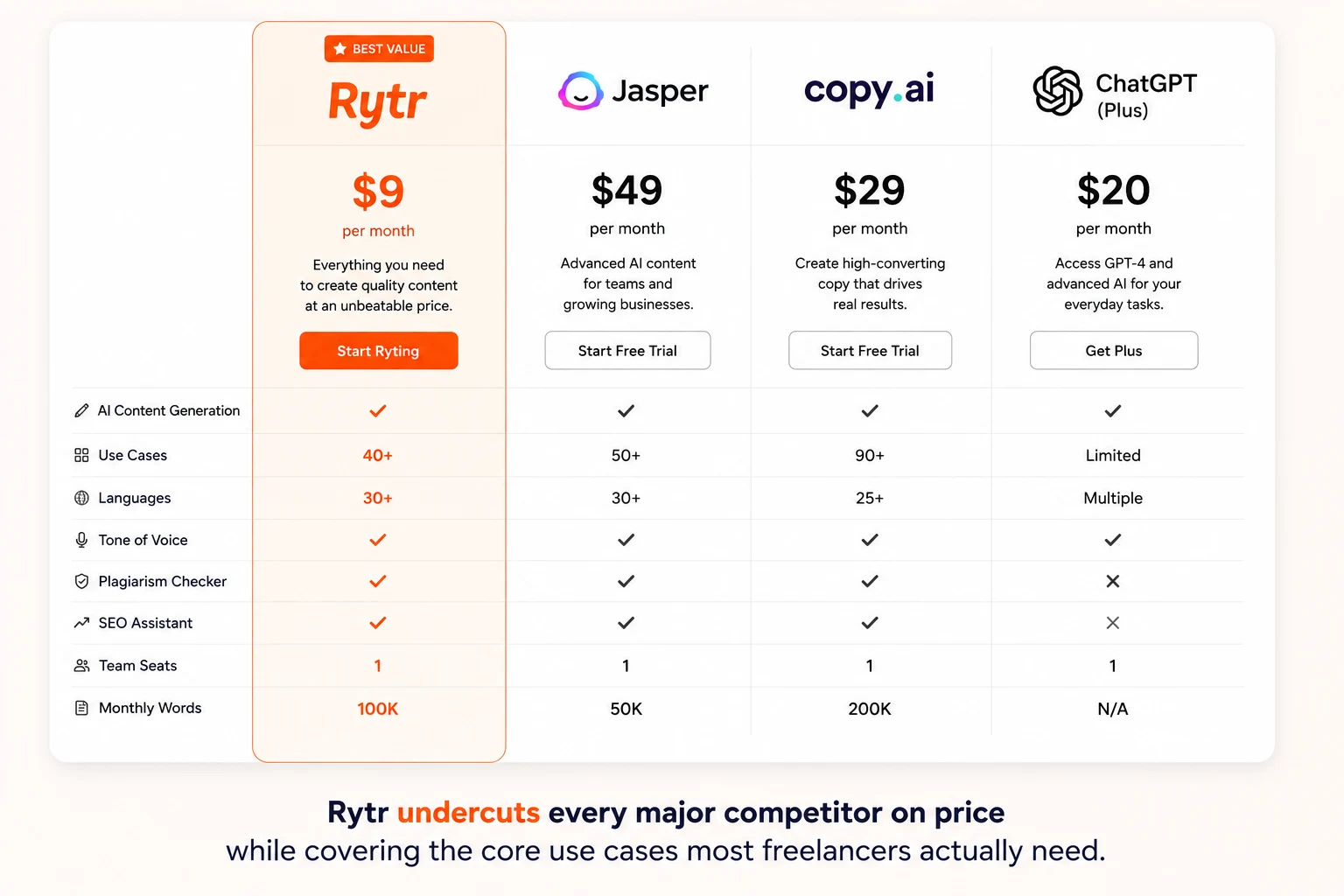
The pitch sounds almost too good. Unlimited AI writing for $9 a month. No character caps. No complicated setup.
But most Rytr reviews you find online were written by people who spent 20 minutes clicking around a demo account. This one is different.
I used Rytr every day for 30 days on real freelance work — social media content for a B2B client, email sequences, product descriptions for an e-commerce store, and blog post outlines. I paid for the account myself. No sponsorship, no early access deal.
Here is what I found.
Quick Summary
Rating: 4.2 / 5
Price: Free plan available — Paid starts at $9/month
Best for: Freelancers and bloggers writing short-form content daily
Not for: Long-form articles over 1,000 words
Free plan: Yes — 10,000 characters per month, no credit card required
Try Rytr free: rytr.me
What Is Rytr?
Rytr is an AI writing assistant built specifically for short-form content. It launched in 2021 and has stayed focused on one thing: helping solo creators and freelancers produce marketing copy quickly without a steep learning curve or a steep price tag.
It is not trying to compete with Jasper's enterprise features or Copy.ai's GTM automation platform. Rytr's bet is simple — most freelancers need fast, affordable drafts, not complex workflows.
Based on 30 days of daily use, that bet mostly pays off.
Who Is Rytr Built For?
Rytr works best if you match most of these:
You are a solo freelancer or small business owner
Most of your writing is under 500 words per piece (social posts, emails, ad copy, descriptions)
You write in English primarily
Budget matters — you want real value under $10 a month
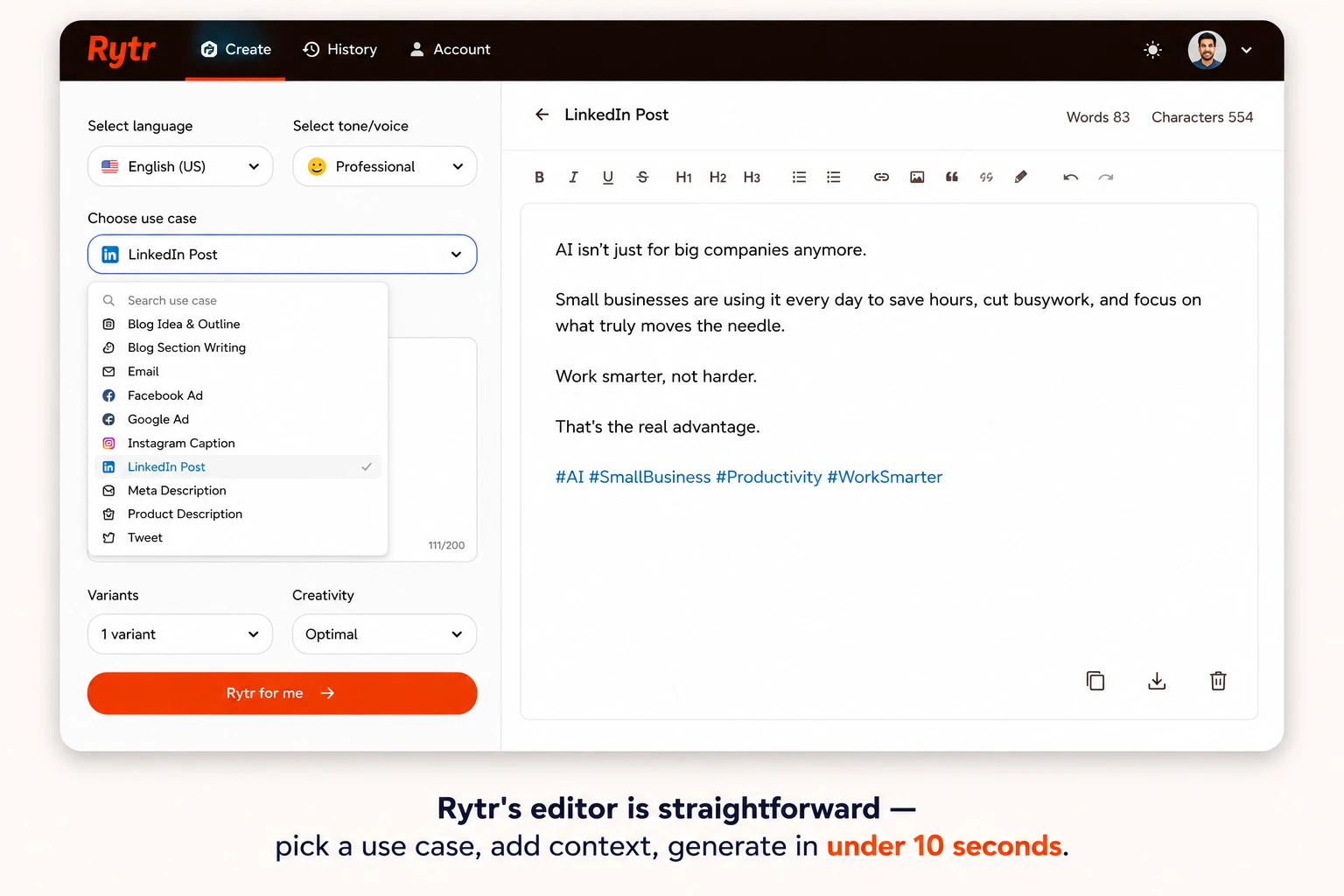
You want to start generating content in under 10 minutes
It is not a good fit if you write long research articles, need multi-language support daily, or want deep SEO integration built in. For those needs, Writesonic or a Claude or ChatGPT subscription makes more sense — more on that in the alternatives section below.
Visit our Free AI Tools for Students in 2026
Rytr Pricing — What You Actually Pay in 2026
Rytr keeps pricing simple with three tiers.
The Free plan gives you 10,000 characters per month — roughly 1,500 to 2,000 words. That is enough to write five or six LinkedIn posts or test the tool properly before committing. No credit card required. Access to all 40+ templates is included on the free plan, which is genuinely generous compared to competitors.
The Saver plan costs $9 per month (or $7.50/month billed annually). This gives you unlimited content generation in one language, 50 plagiarism checks per month, and priority support. For a solo freelancer who writes in English, this is the plan most people will use.
The Unlimited plan costs $29 per month and adds multi-language support (35+ languages), 100 plagiarism checks, and a dedicated account manager. Worth it only if you write across multiple languages or manage multiple client brands.
For comparison: Jasper starts at $49/month. Copy.ai's Starter plan is $29/month. ChatGPT Plus is $20/month. Rytr at $9/month is genuinely the most affordable option that is purpose-built for copywriting tasks.
Reference: Rytr official pricing page
What I Tested — Real Work, Not a Demo
Over 30 days I used Rytr for four types of client work.
Social Media Content
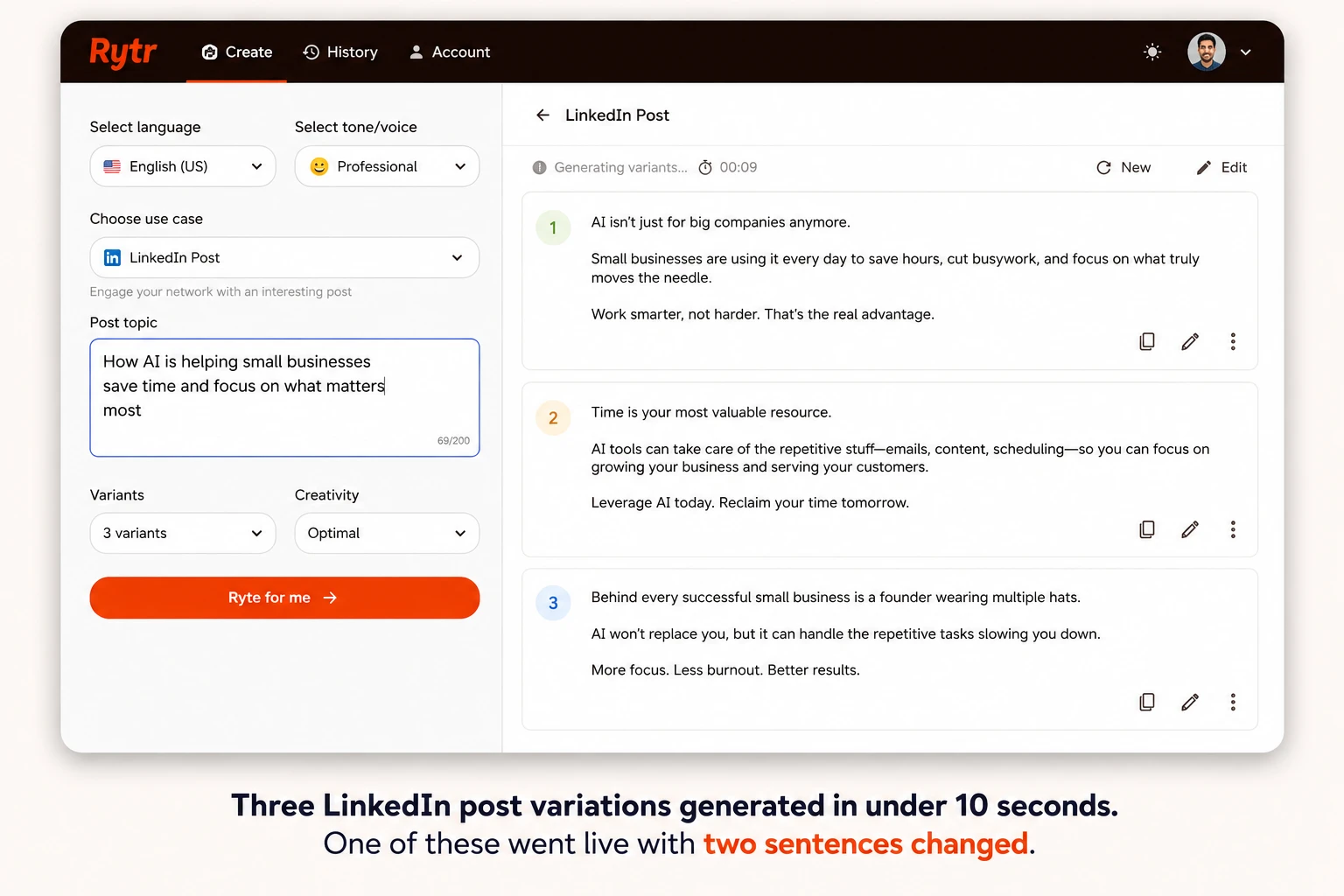
I had a B2B SaaS client who needed 20 LinkedIn posts about productivity. I gave Rytr the same brief for each: topic, key point, professional but conversational tone.
The results were consistent. Most posts needed light editing — tightening a sentence, adjusting a word choice. About a third were close to publish-ready. Generation took under 10 seconds per post.
The AIDA and PAS copywriting frameworks baked into Rytr's templates are genuinely useful here. Rather than starting from a blank page, you get structured output you can shape. For volume social content, this saved me at least two hours compared to writing from scratch.
Email Copy
For a cold email sequence (six emails), I used Rytr's Email and AIDA templates. The structure held up well across all six. Openings were direct, not generic. The PAS formula — Problem, Agitate, Solution — gave each email a clear logical flow.
I edited maybe 30 percent of each email. The remaining 70 percent was usable as generated. That is a solid ratio for a tool at this price point.
Product Descriptions
Fifteen product descriptions for an e-commerce client. This is where Rytr genuinely shines. I fed in product specs and a target tone, and got back descriptions that matched the brand voice with minimal editing. My client could not tell which ones were AI-assisted.
Speed: all 15 drafts in under 25 minutes.
Blog Post Outlines
This is where Rytr starts to show its limits. Outlines came out well — clear H2 structure, logical flow, relevant subpoints. But when I tried to generate full sections within Rytr, quality dropped around the 600-word mark. Repetition crept in. Transitions felt mechanical.
For full blog posts, Rytr is a starting point, not a complete solution.
Where Rytr Falls Short
Long-form content is the real limitation. If you regularly write 1,200-word-plus articles, Rytr will frustrate you. The output quality degrades on extended pieces in a way that costs more time in editing than you save in generation.
Rytr also runs on older language model architecture compared to tools like Jasper or Claude. For most short-form tasks this does not matter. For nuanced, voice-specific writing, you will notice the ceiling.
Multi-language support is gated behind the $29 plan. If you write in French, Spanish, or any language other than English, the $9 plan does not cover it. That is a meaningful limitation for international freelancers.
Rytr vs. The Alternatives
Rytr vs. Copy.ai: Copy.ai has pivoted into a GTM automation platform for marketing teams. As a pure writing tool for solo freelancers, it is overpriced relative to what you actually use. Rytr wins on value for individual creators. Full comparison: Rytr vs Copy.ai for Freelancers — TechVaultAI
Rytr vs. Writesonic: Writesonic has better long-form quality and built-in SEO features. It costs more ($19/month). If long-form content is your primary output, Writesonic is worth the extra cost. If it is mostly short-form, Rytr saves you $10 a month.
Rytr vs. ChatGPT Plus: ChatGPT at $20/month produces higher raw writing quality. It is more flexible but requires you to know how to prompt well. Rytr's template structure removes that learning curve. For freelancers who want speed over customization, Rytr wins. For those who want maximum quality, ChatGPT is better.
Rytr vs. Jasper: Jasper is not really competing in the same bracket. At $49/month it is an enterprise content tool. For solo freelancers, Rytr does 80 percent of what Jasper does at 20 percent of the cost.
Pros and Cons
Pros:
$9/month unlimited is genuinely hard to beat for short-form volume work
Free plan includes all templates — no bait and switch
AIDA and PAS frameworks built into templates reduce the need to know copywriting
Outputs appear in 2 to 5 seconds — fast under deadline pressure
Plagiarism checker included at all paid tiers
No learning curve — usable within 10 minutes of signing up
Cons:
Long-form content quality drops significantly after 600 words
Multi-language support requires the $29 plan
Writing quality ceiling is lower than GPT-4-based tools
No deep SEO integration (no keyword density, no SERP analysis)
Output sometimes repeats phrasing across sections in longer pieces
Final Verdict
Rytr earns its place at $9/month for one specific job: short-form content at scale on a tight budget.
Social captions, ad copy, email drafts, product descriptions, blog outlines — all generate fast at a price no competitor comes close to matching. The free plan is genuinely usable, not a stripped-down trap.
For full blog posts, Rytr is a starting tool, not a finishing tool. Pair it with your own editing and it works. Expect it to do the whole job and you will be disappointed.
If you are a solo freelancer who writes primarily in English and needs fast, affordable short-form drafts, Rytr is the most rational choice in 2026.
Try the free plan first — no credit card, no time limit. If it fits your workflow, $9 a month is one of the better software investments in the creator stack.
Try Rytr Free — No Credit Card Needed
Disclosure: Some links in this post are affiliate links. If you sign up through them, TechVaultAI earns a small commission at no extra cost to you. I tested Rytr independently before writing this review — no sponsorship or early access was involved.
Have you used Rytr? Share your experience in the comments.
FAQ
Is Rytr good for beginners?
Yes. It is one of the easiest AI writing tools to start using. The template-based interface means you do not need to learn prompting. Most users generate their first usable content within 10 minutes of signing up.
Does Rytr have a free plan?
Yes. The free plan gives you 10,000 characters per month with access to all 40+ templates. No credit card is required. It is enough to properly evaluate the tool before paying.
Is Rytr worth it in 2026?
For short-form content at $9/month, yes. It is the most affordable purpose-built AI writing tool available. If you need long-form article quality, tools like Writesonic or Claude offer better output at higher prices.
Can I use Rytr for client work?
Yes. Rytr's terms of service allow commercial use. The content you generate is yours to use and sell.
How does Rytr compare to ChatGPT?
ChatGPT produces higher quality output and is more flexible. Rytr is faster for template-driven work and cheaper. For freelancers who want speed and simplicity, Rytr wins. For those who want maximum writing quality, ChatGPT Plus is worth the extra $11/month.
✅ Bottom Line
Rytr is the best value AI writing tool for short-form content in 2026. At $9/month unlimited, nothing comes close on price. It is not built for long-form articles, but for social posts, emails, and product descriptions it delivers fast, usable drafts with minimal editing. Recommended for budget-conscious freelancers.
📬 Get the Latest Reviews in Your Inbox
Once a week — AI tools, SaaS & gadget reviews delivered straight to your email.