I Automated My Notion With Formulas: What Actually Saved Time

Pros
- Formula properties work on every tier including Free, and they recalculate instantly — no polling delay like Zapier. Formulas 2.0 handles multi-level relations without helper columns, and having database, docs, and notes in one tool means client context sits right next to client data.
Cons
- The error handling is the worst part: a mismatched property name just turns red and tells you nothing. The 15-layer depth limit is easy to hit and hard to trace, and past a few thousand relations rollups silently return incomplete data instead of erroring. It's also a weak CRM — no funnel analytics, no email sync. And the formula system quietly invites over-engineering without ever warning you.
Short answer: two formulas. That's it. After three months of building client and personal systems in Notion, exactly two formulas — "Days Left" and "Progress %" — earned their place and save me around 15 minutes a day. Everything else I built got deleted, because a formula that needs maintenance is not automation, it's a second job.
Every Monday I used to open my client database and go row by row. Which project is due this week. How far along is it. Who's waiting on me. It took maybe fifteen minutes, and it was fifteen minutes of pure clerical work before any actual work started.
So I did the obvious thing: I decided to automate it with formulas.
And I immediately got stuck on the stupidest possible problem.
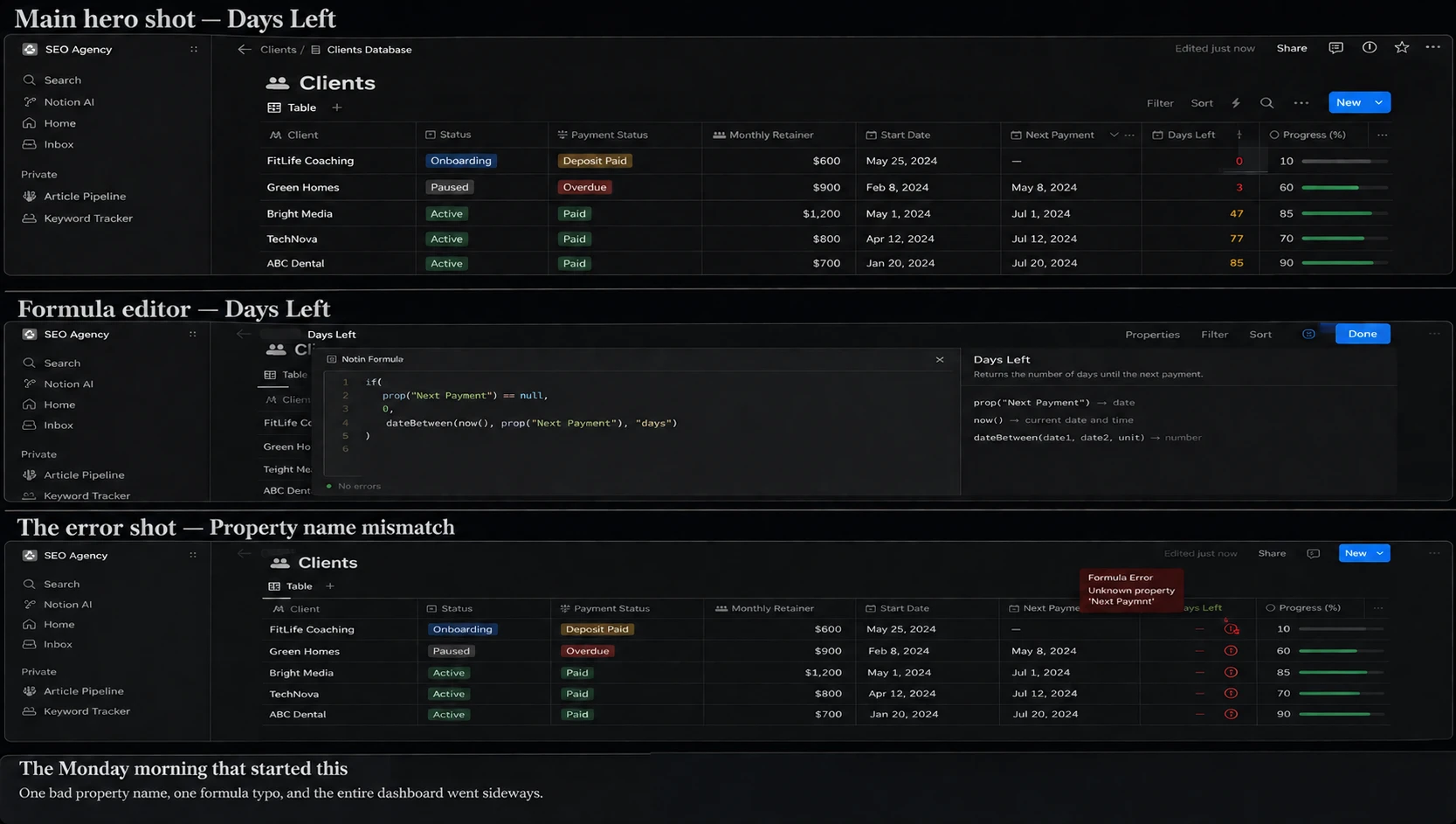
I was writing a rollup-based formula to pull deadline data from a related database, and I could not get the property to resolve. The formula kept erroring. I checked my syntax four times. I re-read the docs. I assumed I'd broken something in the relation.
The actual problem: I was referencing the property name from the related database while the rollup was configured to look at a different one, and the names didn't line up. Notion doesn't tell you that. It just goes red.
I lost the better part of an evening to a name mismatch. If you're stuck right now and your formula "should" work — check the property name in the related database, character for character, before you touch anything else. That's the first thing I check now and it's right maybe half the time.
What most Notion formula guides get wrong
Here's what I noticed after reading about a dozen guides while I was stuck.
Every single one of them is a syntax tutorial. Here's dateBetween(). Here's if(). Here's how to nest map() inside filter(). They're technically correct and they're all optimizing for the same thing: showing you how much you can do.
None of them ask whether you should.
That's the gap. The question isn't "how do I write a Notion formula" — the docs cover that fine. The question is "which formulas are worth the setup cost and ongoing maintenance," and almost nobody answers it, because "use fewer formulas" doesn't make for a very long article.
This is that article.
The 2 formulas I actually kept
Days Left
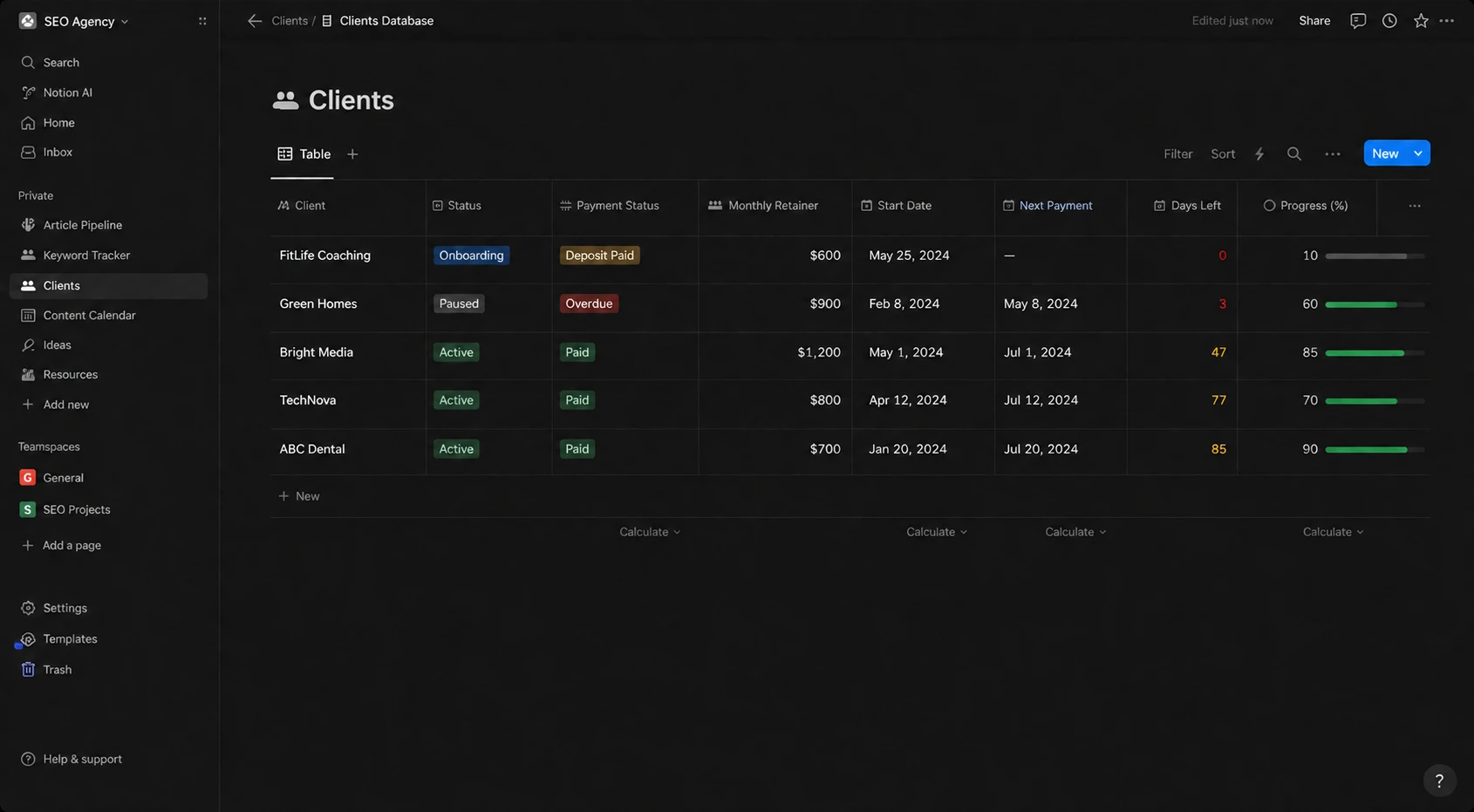
This is the one that replaced my Monday ritual. It calculates the gap between today and the deadline, and surfaces it as a number I can sort and filter by.
The value isn't the calculation — I could do that math in my head. The value is that it's sortable. My board view now orders itself by urgency without me touching it. I open Notion and the thing that's most on fire is at the top.
That alone is most of the 15 minutes.
Setup cost: about 20 minutes, including the mistake above. Maintenance since: zero.
Progress %
A completion percentage pulled from the related tasks. Green bar, done tasks over total tasks.
This one is less about me and more about clients. When a client asks "where are we on this," I don't write a paragraph. I share the view. The bar is the answer.
It also caught something I wasn't expecting: projects that look active but haven't moved in two weeks are obvious at a glance when everything else is climbing. I've caught two stalled projects that way that I'd otherwise have noticed a week later.
Setup cost: roughly 15 minutes. Maintenance since: zero.
That's the whole system. Two formulas. If you're expecting a list of twelve, this is the part where I disappoint you — but stay for the next section, because that's the more useful half.
What I tried and rejected
This is the part I wish someone had written before I burned three months.
Zapier and Make.com
Before I went deep on formulas, I tried to solve the whole problem externally. Push data into Zapier, do the logic there, write it back.
Why I dropped it: the delay. Third-party automation runs on a polling interval, so your data is correct eventually. For anything you want to look at and trust in the moment — a deadline countdown, a status — "eventually" is useless. I'd open the board, see stale numbers, and not know whether they were stale or wrong. That uncertainty is worse than doing it manually, because at least manual data you know you can trust.
Formulas recalculate the instant the source changes. For live status, that's the entire ballgame. External automation earns its place when you need to move data between apps — not when you need to compute something inside one.
A deep chain of formulas referencing other formulas
At my worst point, I had formulas feeding rollups feeding formulas. It felt clever. It was not clever.
Notion formulas can only be 15 layers deep — every time a formula references another formula or rollup, it adds a layer, and this applies even if the formula is in a different database. I hit that ceiling. When you hit it, you don't get a helpful "here's the chain that broke" message; you get an error and a puzzle.
But honestly the depth limit wasn't the real problem. The real problem was that I no longer understood my own system. When something displayed wrong, tracing it took longer than the formula ever saved. Notion's own guidance is to simplify by combining unnecessary formulas and rollups into fewer properties and merging ones that do similar things — which I now think should be the starting advice, not the troubleshooting advice.
Building rollups when a formula would do (and vice versa)
I flip-flopped on this for weeks. The rule I landed on: rollups are the right choice when you're pulling data from a directly related database and no complex calculation is needed, while Formulas 2.0 handles multi-level relations without stacking extra helper properties. If you can describe what you want in one sentence with no "and then," use a rollup. It's faster and it breaks less.
An automated client status label
I built an if() chain that assigned each project a status — On Track, At Risk, Overdue — based on days remaining and completion.
I killed it after a week. Not because it broke, but because it was wrong in the way that matters. A project 80% done with three days left might be totally fine or a disaster, depending on what's left. The formula couldn't know that. And a confidently wrong status label is worse than no label, because you stop looking closely.
I replaced it with: Days Left, sorted. My judgment does the rest.
The unpopular opinion
The best Notion systems I've seen — and the fastest ones — are minimalist. A clean database structure, two or three specific formulas, and a good page template. Almost everything beyond that doesn't make the system more capable. It makes it slower, and it makes you lazier about the thinking the tool was never going to do for you.
I'd go further: the number of formulas in your workspace is roughly inversely correlated with how much time it saves you. Every formula is a small ongoing tax — a thing that can break, a thing you have to remember, a thing that has to be understood before you can change anything nearby.
Two formulas that never break beat fifteen that mostly work.
There's a version of Notion-as-hobby where building the system is the point, and that's fine — it's genuinely fun. Just be honest with yourself about which one you're doing. I spent about six of my twelve weeks doing the hobby version while telling myself it was work.
Something the docs don't warn you about
Relations have no hard cap, but that's not the same as being free. According to Notion's engineering team there's no hardcoded limit on how many pages can be related to a single page, but once you approach a couple thousand you'll likely see performance degradation. And if you pull data from a rollup and then reference that rollup, you'll start running into missing data past 15 references.
The nasty part is the failure mode. It doesn't error. It just quietly returns incomplete data. Your formula shows a number, the number is wrong, and nothing tells you. If you're building anything at real scale, spot-check your totals against a manual count once. Once is enough to find out.
Formula vs rollup vs automation: which one for what
| You want to... | Use | Why |
|---|---|---|
| Show a countdown or calculation from properties on the same row | Formula | Instant recalculation, no dependencies |
| Sum, count, or average from a directly related database | Rollup | Simpler, fewer moving parts, harder to break |
| Do a calculation across multi-level relations | Formula 2.0 | Iterates relations without helper properties |
| Trigger an action when something changes (notify, create a page) | Database automation | Formulas can't take actions, only compute |
| Move data between Notion and another app | Zapier / Make | Accept the delay; it's the cost of crossing apps |
| Anything requiring human judgment | Nothing | Show the inputs, decide yourself |
What this costs
Formulas themselves are free on every Notion tier, including the Free plan. That's worth saying plainly, because a lot of "automate your Notion" content quietly assumes you're paying.
Where cost enters: creating and editing database automations requires the Plus plan or higher — on Free you can use templates containing automations but can't edit them.
Current Notion pricing as of July 2026:
| Plan | Price (annual) | Relevant to this |
|---|---|---|
| Free | $0 | Formulas: yes. Editing automations: no |
| Plus | $10/user/mo | Automations unlocked |
| Business | $20/user/mo | Full Notion AI and agents |
| Enterprise | Custom | Advanced controls |
As of July 2026 full Notion AI — agents, AI meeting notes, and enterprise search — is bundled into Business and Enterprise rather than sold as a separate add-on, with metered agent credits billing on top of seats. If your plan was "get the AI add-on and have it write my formulas," that path closed. Prices change, so confirm on Notion's pricing page before you commit.
Who should skip this entirely
Be honest about which one you are:
- You use Notion mainly for notes and writing. Skip formulas. Genuinely. You will spend more time building than you ever recover.
- Fewer than ~10 rows in your database. Your eyes are faster than any formula. Come back at 30 rows.
- You need real conditional logic and reporting. You've outgrown the tool. Notion has no built-in funnel analytics and no native email sync — if you're trying to force a sales pipeline in here, look at ClickUp or a real CRM instead.
- You want local-first, plain-text, and speed above all. Different tool entirely — see Notion vs Obsidian.
Who should do this
- Freelancers or agencies tracking 10–50 client projects. Days Left alone justifies the setup.
- Anyone whose Monday starts with manually scanning a board.
- Anyone who's about to build their fifteenth formula and has a quiet feeling something's gone wrong. It has. Delete twelve of them.
How to actually start (30 minutes, two formulas)
- Build the database structure first. Get relations right before you write a single formula — every formula problem I had traced back to structure.
- Add Days Left. Sort your main view by it. Live with that for a week.
- Only if you still feel friction, add Progress %.
- Stop. Wait two weeks. If a third formula still feels necessary after two weeks, it probably is. If you can't remember what you wanted it for, that's your answer.
The two-week wait is the whole trick. Most formula ideas die on their own if you don't act on them immediately.
If you want a fuller walkthrough of the underlying structure, I've written up the client-tracking database I built in detail, and the full Notion review covers where the tool sits overall.
Frequently Asked Questions
Are Notion formulas free?
Why does my Notion formula say the property doesn't exist?
What is the Notion formula depth limit?
Should I use a rollup or a formula?
Can Notion AI write my formulas?
The bottom line
Three months in, my Notion setup does less than it did at week six and saves more time. Two formulas, one clean structure, no dependency chains. About 15 minutes a day back, and — more valuable — I understand every part of my own system.
The instinct to automate everything is the thing to resist. Automate the clerical scanning. Keep the judgment.
Before you build your next formula, it's worth checking whether the page it lives on is doing anything for you at all — run it through the free Website Audit tool on Tech Vault AI and see.
Pricing verified against public sources in July 2026 — confirm current rates on Notion's pricing page.
Bottom Line
Notion's formula system is more powerful than most people need, and that's the trap. Two well-chosen formulas gave me back roughly 15 minutes a day; the twelve I built beyond that cost me weeks and got deleted. Buy it for the database structure, not the automation ceiling. If you use it for notes only, the Free plan is genuinely enough and you should not pay.

Written by
Asif IqbalSenior Writer
Asif Iqbal is the Founder & CEO of Tech Vault AI, leading the team's hands-on testing of AI tools and SaaS products & Tech reviews. He's focused on cutting through marketing hype to help readers find what actually works.
📬 Get the Latest Reviews in Your Inbox
Once a week — AI tools, SaaS & gadget reviews delivered straight to your email.