Best Notion Templates 2026: Free & Paid Picks for Every Use Case

Published: July 1, 2026 | Last Updated: July 1, 2026 | Author: Tech Vault AI Editorial Team
The first Notion template I ever downloaded had 47 pages, 12 linked databases, and a "command center" dashboard that required a 20-minute setup video just to understand what I was looking at. I spent three hours configuring it. Used it for four days. Abandoned it entirely.
That experience taught me something that most "best Notion templates" lists get wrong: complexity is not a feature. The templates that actually stick are the ones you can open, understand in five minutes, and start using immediately — even if they do less than the elaborate 47-page system that looked impressive in a YouTube thumbnail.
Notion's marketplace now holds over 30,000 community templates, and most of them are free. The hard part is finding the ones worth using. This list is the result of weeks of testing templates across five use cases — freelancing, studying, productivity, personal finance, and team management. I deleted more than I kept.Who Should Skip This List
If you are completely new to Notion and have never used a database before, templates will feel overwhelming. Spend one week learning Notion's core blocks and database structure first. Our Notion productivity guide for beginners covers the foundation before you start adding templates on top of it.
If you are an advanced Notion user who builds custom systems from scratch, most templates on this list will feel too simple. Skip to the paid templates section — the Freelance OS and Second Brain OS are the ones power users actually find useful.
Everyone else: keep reading.
The Hidden Problem With Most Template Lists
Before the picks, something worth saying that most roundups don't:
Notion users are notorious tinkerers — not monks of minimalism. If you're diving into yet another "best Notion template" article, set your expectations honestly: it'll never fit your life out of the box.Every template on this list will need at least 15–30 minutes of customization before it fits your actual workflow. That is normal and expected. The goal of a good template is not to be perfect — it is to give you a structure worth adapting, not a blank page worth dreading.
The templates I rejected for this list were mostly rejected for one of two reasons: too complex to start using immediately, or too simple to provide genuine structure. The picks below hit the middle ground.
Best Free Notion Templates
1. Projects & Tasks (Notion Official) — Best for Work and Freelancers
Price: Free — Get it from Notion's template gallery
Best for: Freelancers managing multiple clients, remote workers, project managers
I used this for six weeks managing client work across four active projects. What makes it work is the linked database approach — every task belongs to a project, and every project shows its associated tasks. You always have two answers at once: what are all my tasks right now, and which project does each one serve?
The setup takes about 20 minutes. After that, it runs on its own logic.
The honest limitation: The default setup has no time tracking. If you bill clients by the hour, you'll need to add a time log property or integrate with a separate tool. For hourly billing, the Freelance OS template below is worth the paid price.
2. Student Dashboard (Notion Official) — Best for Students
Price: Free — Get it from Notion's template gallery
Best for: University, college, and high school students managing multiple subjects
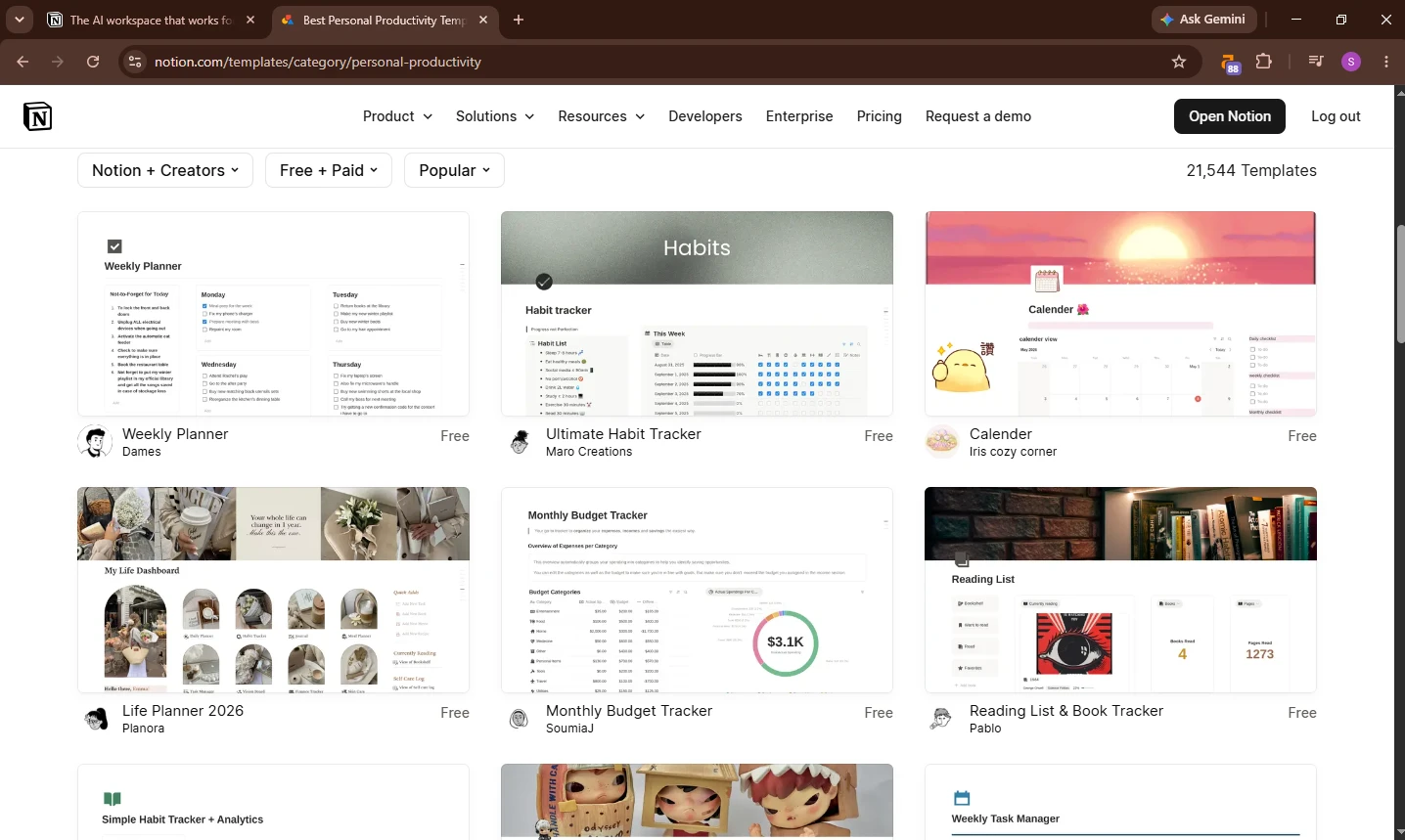
I tested this against three other student templates during two weeks of academic work simulation. The official Notion student template won on one criterion that mattered most: it is the fastest to set up correctly. Most community student templates look better. This one works better.
The honest limitation: The design is minimal to the point of being bland. If visual design motivates you to open your workspace, look at the Aesthetic Student Life Dashboard from Gridfiti — it covers the same bases with significantly better aesthetics.
3. Personal Finance Tracker — Best for Budgeting
Price: Free (multiple community versions available)
Best for: Anyone trying to track income, expenses, and savings in one place
I ran my freelance income and expenses through a Notion finance tracker for three months as a test against my existing spreadsheet setup. The Notion version won on one specific thing: being able to link an income entry directly to the client project that generated it. In a spreadsheet, those are two separate files. In Notion, they are the same record.
The honest limitation: For complex financial tracking — investments, tax categorization, multiple income streams — a dedicated tool like YNAB or a proper spreadsheet still beats Notion. This template works for straightforward monthly budgeting. It does not replace financial software.
4. Weekly Planner — Best for Daily Structure
Price: Free
Best for: Anyone who wants a simple weekly system without database complexity
Simple works. A weekly planner with a single database, a calendar view, and a daily note section is genuinely sufficient for most people's daily structure needs. I use a version of this myself — it has not changed meaningfully in eight months because it did not need to.
The hidden advantage most reviews miss: A simple weekly planner is significantly easier to maintain on mobile than any complex database system. If you update your workspace primarily on your phone, simple wins every time. Elaborate templates look impressive on a desktop and fall apart on a 6-inch screen.
5. Content Calendar — Best for Creators and Bloggers
Price: Free (Notion official template)
Best for: Bloggers, YouTubers, social media managers, content teams
I use a version of this for Tech Vault AI's own content planning. The multi-view capability — same content database viewed as a calendar, a status board, and a table — is genuinely useful for content work because different planning tasks benefit from different views. Seeing deadlines in a calendar and pipeline stages on a Kanban board from the same data is the reason I stopped using a separate content planning tool.
Best Paid Notion Templates
6. Freelance OS — Best for Freelancers Who Run Their Business in Notion
Price: $39–$79 (varies by version and creator)
Best for: Freelancers who want one system for clients, projects, finances, and time tracking
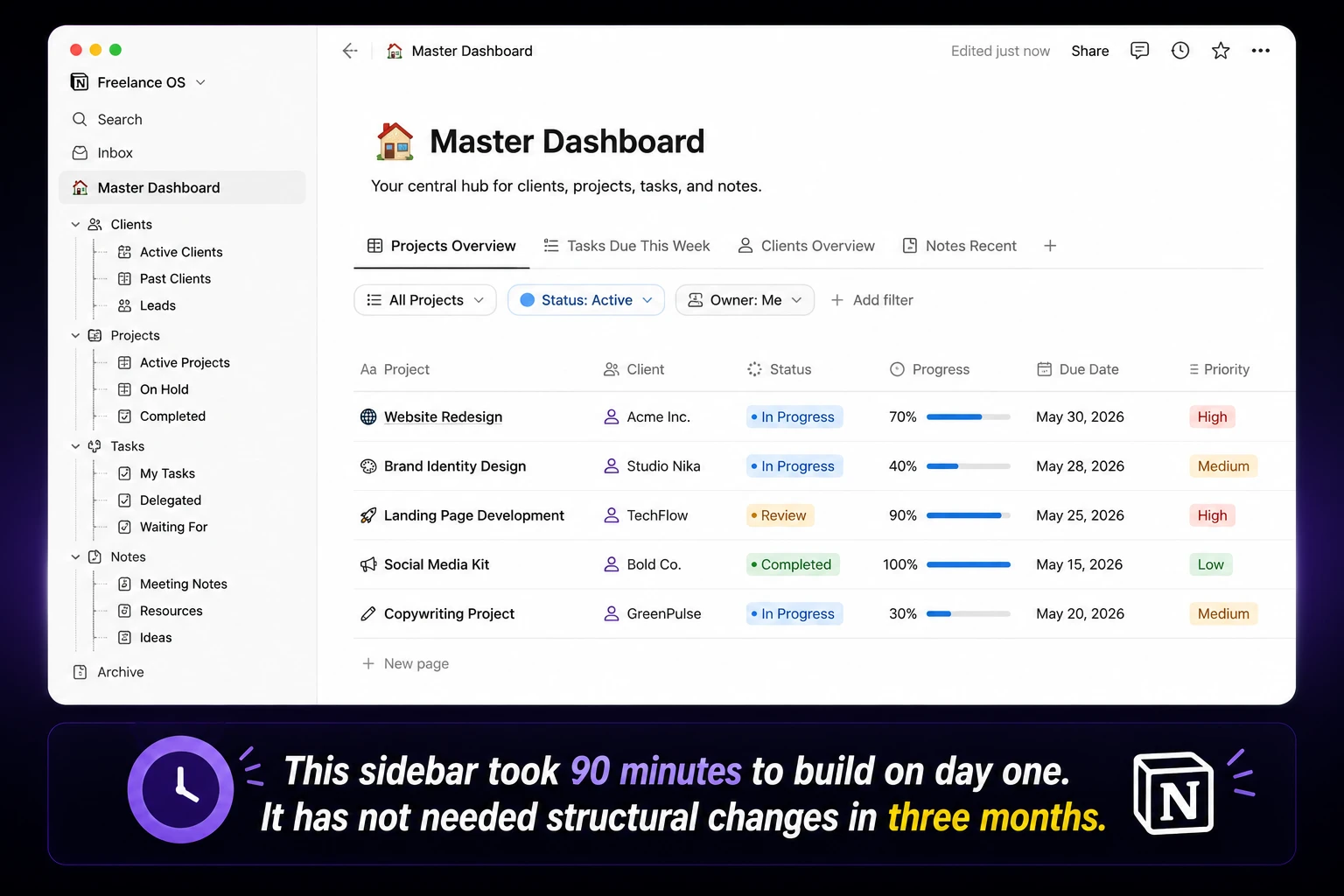
The free Projects & Tasks template covers task management. The Freelance OS covers the whole freelance operation: clients, projects, invoices, time tracking, proposals, and goals — all linked. If you are running a freelance business and currently managing these across three or four separate tools, the Freelance OS consolidates them in a way that free templates do not attempt.
Is it worth the price? If you spend more than 15 hours a week freelancing and currently use multiple disconnected tools to manage that work — yes. The setup time is 2–3 hours, and the ROI in time saved starts showing up in week two.
What genuinely disappointed me: The invoice generator, while functional, produces basic PDF exports. For professional invoicing with tax fields, payment status tracking, and client-facing portals, a dedicated tool like HoneyBook or Wave still produces better output. Freelance OS covers invoicing adequately. It does not replace invoicing software for high-volume freelancers.
7. Second Brain OS — Best for Knowledge Management
Price: $29–$69 (varies by creator)
Best for: Researchers, writers, students with large note collections, anyone who builds knowledge over time
The Second Brain concept — capturing everything into one connected system organized by Projects, Areas, Resources, and Archives (PARA method) — is one of the most useful personal knowledge management frameworks available. The Notion implementation works better than most alternatives because Notion's database linking lets you connect a note to the project it belongs to and the reference materials it draws from simultaneously.
The hidden catch: A Second Brain template is only valuable if you actively add to it. Most people who buy it spend a weekend migrating old notes, use it intensively for a month, and gradually stop adding new material. The template is not the problem — the habit is. If you are not already a consistent note-taker, a Second Brain template will not make you one. If you are, it gives you the best structure available for Notion.
8. Notion Life OS — Best for All-in-One Personal Management
Price: $19–$49 (varies by creator)
Best for: Anyone who wants one Notion workspace to manage every area of life
The Life OS is the most ambitious template category — tasks, habits, finances, health, relationships, goals, and reading all in one workspace. The best versions are genuinely impressive. The risk is the complexity trap: spending more time maintaining the system than actually working.
Who it works for: People who enjoy system design and get genuine value from seeing their whole life in one view. If optimizing your workspace is something you find energizing rather than tedious, a Life OS template is worth the investment.
Who should skip it: Anyone who wants a simple, low-maintenance system. A Life OS requires active maintenance. If you already know you tend to abandon elaborate systems, buy one category template (just the finance tracker, or just the habit tracker) and expand only after you've used the first piece for a month.
Templates I Tested and Did Not Recommend
Aesthetic Life Planner (various creators): Beautiful. Genuinely beautiful. Also significantly slower to load than functional templates because of the embedded widgets, image dividers, and custom fonts. On mobile, some aesthetic templates take 3–5 seconds to load. For daily use, that friction compounds. The gap between free and premium templates is narrowing, but some advanced automations or exclusive widgets may still be reserved for premium versions — and the visual appeal can come at the cost of load speed.
ADHD Daily Dashboard: Thoughtfully designed for ADHD-specific workflows — reduced visual clutter, checkbox-heavy, time-blocking built in. Worth trying if ADHD is a real factor in your workflow. Not worth using if it is not — the simplified structure removes features most people actually need.
Business Model Canvas templates: Useful for a one-time business planning session. Not something you maintain or return to. Free versions cover this use case completely — there is no reason to pay for a Business Model Canvas Notion template.

How to Choose the Right Template
If you break down the truly best Notion templates, adaptability is non-negotiable. The most popular templates won't try to force you into someone else's workflow. There will be space to add or hide modules, change views, and make things match the rhythm of your actual week.Three questions to ask before downloading any template:
- Will I actually use all the sections? If a template has a habit tracker, a reading log, a mood journal, and a meal planner — and you only care about task management — you are downloading something you will spend time deleting. Find a template that covers exactly what you need, not one that covers everything.
- How long does setup take? If a template requires a 30-minute setup video before you can use it, that is a red flag for ongoing maintenance complexity. The templates on this list can all be operational within 20–30 minutes without watching anything.
- Does it work on mobile? Most Notion work happens on desktop. But if you update your task list, log expenses, or capture notes on your phone, test the template on mobile before committing. Complex database views and heavy aesthetic templates frequently break down on mobile in ways that are not obvious on desktop.
Notion Templates vs. Building Your Own
One honest recommendation before you go: for most use cases, a simple custom workspace you build yourself will outperform any downloaded template within three months.
The reason is fit. A template is built for a generic version of your use case. Your actual workflow has specific quirks, preferences, and friction points that no template creator can anticipate. Building your own workspace — even a basic one — means every database property and view was put there because you specifically needed it.
The best use of templates is as starting points and structural inspiration, not as finished systems. Download three or four templates from this list, look at how they structure their databases and views, then build your own version based on what you observed. That is how most experienced Notion users actually work.
For the full Notion setup process — including how to build your own databases from scratch — see our complete Notion guide for beginners at Tech Vault AI and our Notion review for 2026.
Quick Reference: Best Template by Use Case
| Use Case | Best Free | Best Paid |
|---|---|---|
| Freelance work management | Projects & Tasks | Freelance OS |
| Student academic planning | Student Dashboard | Aesthetic Student Planner |
| Personal productivity | Weekly Planner | Notion Life OS |
| Knowledge management | Basic notes + PARA setup | Second Brain OS |
| Content creation | Content Calendar (official) | Content OS (paid versions) |
| Personal finance | Personal Finance Tracker | Finance OS |
| All-in-one life management | Light Aesthetic Dashboard | Notion Life OS |
FAQ
Are free Notion templates worth using in 2026?
Yes. The gap between free and premium templates is narrowing. Many free Notion templates now offer multi-page setups, trackers, and widget integrations that rival paid options. For most use cases — student planning, basic project management, weekly productivity — free templates are sufficient. Pay only when you need features the free versions genuinely lack.
How do I add a Notion template to my workspace?
Click the template link, hit "Duplicate" in the top right corner of the Notion page, and select your workspace. The template copies to your workspace in under 30 seconds. From there, delete what you don't need and customize what you do.
Which Notion template is best for freelancers?
For basic project and task management: the free Projects & Tasks official template. For managing your full freelance business — clients, invoices, time tracking, proposals — the Freelance OS paid template ($39–$79) is worth it if you freelance more than 15 hours a week.
What is the best free Notion template for students?
Notion's official student template brings courses, lecture notes, homework, and a to-do list into one dashboard. A calendar view shows all course tasks with due dates, preventing the "I forgot about that assignment" problem that plagues students managing multiple classes. Start there before exploring aesthetic or feature-heavy community templates.
Are paid Notion templates worth the money?
For the Freelance OS and Second Brain OS — yes, if they match your actual use case. For most aesthetic or life planner templates — try the free equivalent first. The paid versions are usually more polished, not fundamentally more capable.
Where can I find the best Notion templates?
Notion's official template gallery (notion.so/templates), Notioneverything.com, Gridfiti.com, and Gumroad for paid creator templates. For more Notion guides and comparisons, see our full Notion coverage at Tech Vault AI.
About the Author
Tech Vault AI Editorial Team — We test productivity tools, AI apps, and gadgets so you can make faster, better-informed decisions. No paid placements, no spec-sheet summaries. Explore more honest reviews at Tech Vault AI →
Sources: 2sync.com (April 2026), Bullet.so (May 2026), Notioneverything.com (January 2026), Gridfiti.com (January 2026), Plandio.com (December 2025), Notion4management.com — all verified July 2026. Last updated: July 1, 2026.
Which template actually changed how you use Notion? Share it in the comments — the ones that come up most often will get their own dedicated review.

Written by
Asif IqbalSenior Writer
Asif Iqbal is the Founder & CEO of Tech Vault AI, leading the team's hands-on testing of AI tools and SaaS products & Tech reviews. He's focused on cutting through marketing hype to help readers find what actually works.
📬 Get the Latest Reviews in Your Inbox
Once a week — AI tools, SaaS & gadget reviews delivered straight to your email.